The Run Rates Process places a dollar value against the individual actual records generated from the variable and fixed Rate Type queries. To run the Rates Process follow these steps.
-
Select the Run Rates Process menu, from the Rates Management menu.
Note: A Loading Categories progress bar will appear whilst the categories are being loaded.
- Select the Rate Category using the drop down list.
-
Select the Period to be used for the process.
Note: The start and end dates for the selected period will be placed into the date fields between the Period field and the Run Rates Process button.The calendar to be used for the rate is established in the Rate Category.
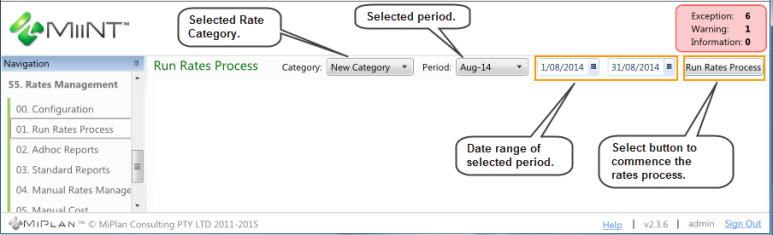
In the above example the New Category has been selected for the August 2014 period .
-
Select the Run Rates Process button to begin the Rates process.
Note: A progress bar will appear whilst the rates are being processed displaying the current situation.
-
The results are automatically saved.
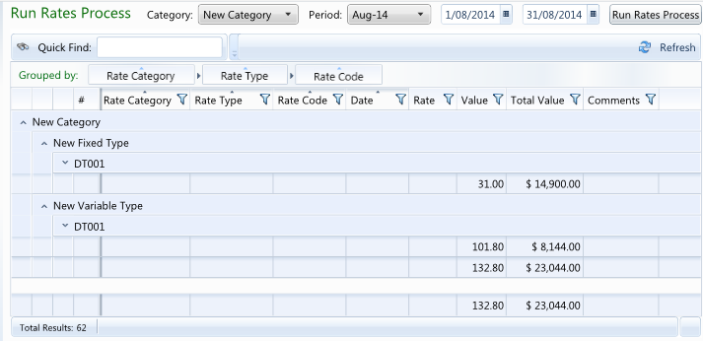
In the above example the fixed and variable rates have been calculated for the rate codes under the New Fixed Type and New Variable Type rate types within the New Category for production records dated between the 1/08/2014 and 31/08/2014.
-
Select either of the DT001 down arrows to display the rate calculation records.
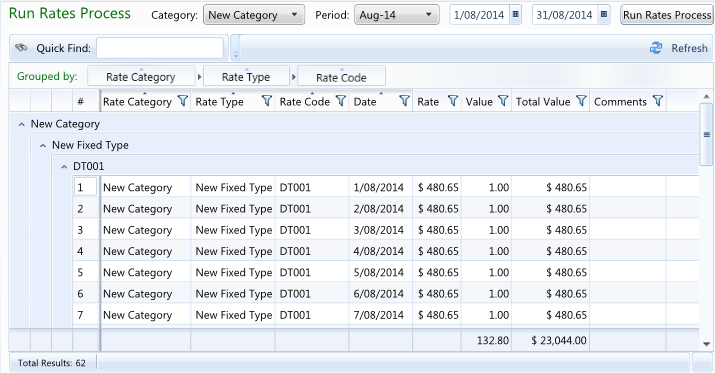
In the sample above the DT001 fixed rate calculations have been displayed.
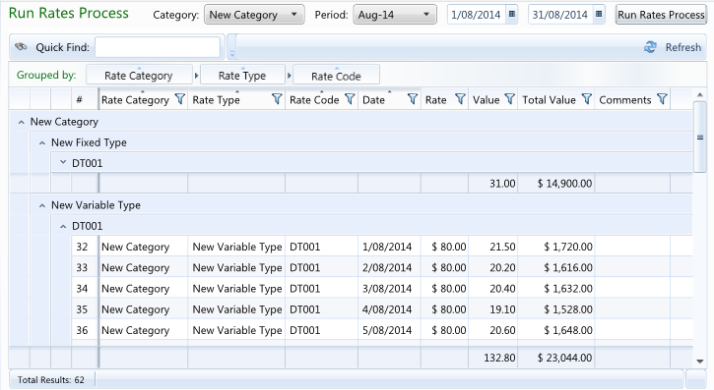
In the sample above the DT001 variable rate calculations have been displayed.
Note: The results from the Run Rates Process are displayed using a MiiNT Rule called Rates Execute Result. Refer to the Rules topic for information on the rule.